
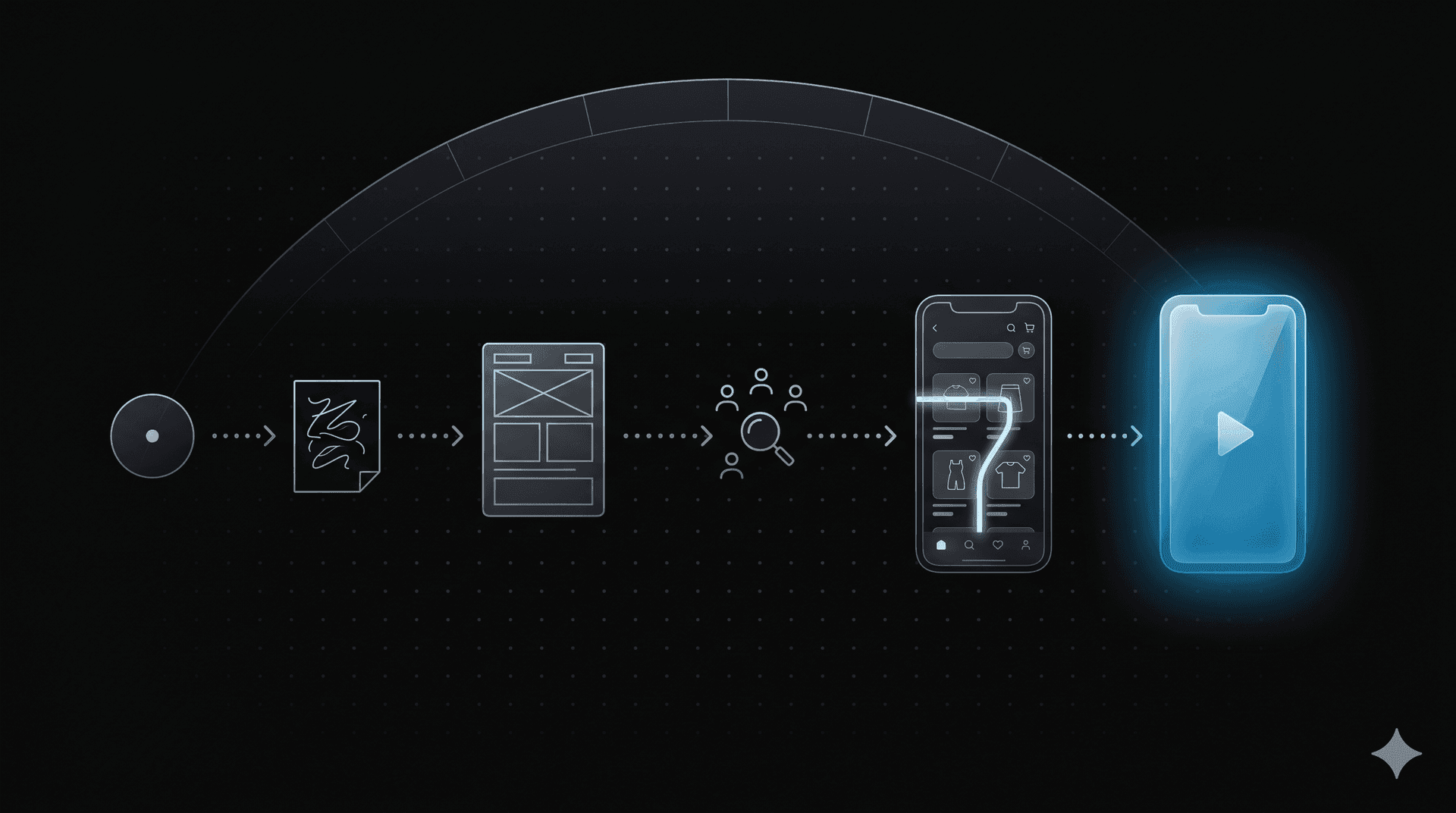
the question every founder asks first
"how do i design the ux for my mvp?"
it sounds like a design question. it is actually a strategy question. the ux for an mvp is not "a smaller version of the full product." it is the smallest possible artefact that lets you learn whether the idea works at all. everything else is decoration.
this guide is the order of operations we use at maxiphy, refined across roughly a hundred mvps for founders in lebanon, the uae, and the gcc. you can run it as a 30-day sprint or stretch it across three months. the order does not change.
what an mvp is, and what it is not
an mvp is a sharp instrument for learning. it has one job: prove that a target user, given the product, will do the one thing that matters for the business.
that's it.
it is not:
- a smaller version of the full product
- everything you can ship in 4 weeks
- a polished prototype that "feels real"
- a list of features ranked by importance
an mvp tied to a feature list is a roadmap, not a learning tool. you will not know what to build next, because you will have built everything you wrote down before you knew if any of it mattered.
the test of a good mvp is not whether users like it. it is whether you learn something specific from it that changes what you build next.
the seven steps in order
1. write the one sentence
before any design, you write one sentence: "a [user] will [action] because [reason]."
example: "a freelance designer will subscribe to our scheduling app because it eliminates double-bookings without giving up control of their calendar."
if you cannot write this sentence, you are not ready to design anything. go back to product strategy.
2. define the success metric
decide, before you design, what number tells you the mvp worked. a single number. examples:
- 30% of signups complete the first booking within 7 days
- 40% of users return in week 2
- average session length above 4 minutes for the core flow
vague success metrics ("we will see if users like it") produce mvps that learn nothing. precise metrics force the design to focus on the moment that produces the metric.
3. map the critical path
draw the sequence of screens between "user lands on the product" and "user does the thing in step 1." this is the critical path.
every screen on the critical path is in the mvp. every screen not on the critical path is out, by default, until you have evidence it changes the metric in step 2.
a typical mvp critical path is 4 to 7 screens. if yours is longer than 12, you are designing the full product, not an mvp.
4. wireframe the critical path
low fidelity. one screen per concept. no colour, no type system, no logo placement. the goal is to make the flow legible, not to make it beautiful.
the mistake most teams make at this step is opening figma and reaching for a ui kit. you don't need a ui kit yet. you need to know if the flow makes sense to a real human.
5. test the wireframes with five users
show the wireframes to five real people in your target audience. ask them to talk you through what they would do on each screen.
if four out of five hesitate or get the flow wrong, the issue is the flow, not the visuals. fix the flow first.
if four out of five flow through it cleanly, you have a wireframe worth designing.
five users will surface roughly 85 percent of the usability issues in any flow. it is not a science but it has been true on every project we have run since 2015.
6. design the high-fidelity version of the critical path
now you can open figma and reach for the ui kit. but only for the critical-path screens. resist the urge to design the empty states, the marketing pages, the settings screen, the password reset flow. these are not on the critical path.
the design system is whatever is necessary for these 4 to 7 screens. one font. one accent colour. five components. you can grow the system later.
7. build a clickable prototype and ship it as the mvp
a clickable figma prototype, properly framed, is a legitimate mvp for many products. for others — anything transactional, anything multi-user — you need a real implementation.
either way, you ship the critical path only. you give yourself two weeks of users on it. then you read the metric.
the order matters more than the skill
most mvp failures are not design failures. they are order failures: a team writes feature lists before user sentences, opens figma before testing wireframes, designs settings screens before the critical path. the mvp ships, no one learns anything, and the team rebuilds the parts that should have been thrown away.
the order in this guide is built to prevent that. follow it and an mvp is a 30-day exercise that produces real learning. skip it and an mvp is a six-month exercise that produces a backlog.
what a maxiphy mvp sprint looks like
we run mvps as a 30-day ui/ux sprint. discovery in week 1, wireframes and validation in week 2, high-fidelity design in week 3, prototype and developer handoff in week 4. by day 30, you have:
- a clear sentence describing what your mvp proves
- a precise success metric
- a tested critical path
- a high-fidelity, clickable prototype
- a developer handoff kit ready to be implemented
you can build it with us, with another agency, or with your own team. the sprint produces certainty. what you do with the certainty is up to you.
30 days
from idea to dev-ready prototype
5
users tested before high-fidelity
4-7
screens on the critical path
1
success metric to define before design
if you are starting an mvp in 2026 and want a structured way to run it, book a free discovery call. 30 minutes, no pitch, an honest conversation about your product and whether a sprint is the right next step for you.